

Fun with SDL3 and Clay (2)
By the end of the last blog post, we had managed to set up SDL3, open a resizable window, render a static blue background, and handle the event of the user pressing the escape key to close the application.
Here’s a snapshot of the project so far. Our current file tree looks like this:
├── Makefile├── out/│ └── app├── resources/└── src/ ├── event.c ├── init.c ├── iterate.c ├── quit.c └── state.hIt’s time to add some UI!
Clay
The case for Clay
SDL is quite a small, low-level library. It’s not a framework or a GUI toolkit, and doesn’t provide any tools to manage the layout of the components that make up your user interface on screen. If the user resizes the window, it’s up to us to manually handle that window resize event and figure out how to correctly draw the UI in the new window size.
Personally, I really appreciate the tree-based way we build UI in the browser with HTML and CSS. I especially like the flexbox layout module as it’s very intuitive to reason around the placement of objects in flex-based layouts, regardless of the current window dimensions. Throw in a few media queries, a modern, component-based frontend framework like Svelte, and TailwindCSS to colocate HTML and styling concerns, and it becomes very easy to rapidly hack together responsive web UI inside a tight feedback loop.
Clay is a zero-dependency, renderer-agnostic layout library created by the brilliant Nic Barker, and brings the joys of <div class="flex"> soup to C developers. It’s insanely cool, but I’ll let Nic sell it to you:
We’re going to use Clay to handle our app layout. Unfortunately the API has changed a little since this video, so you can’t simply follow the tutorial section to get up and running. The github repo provides up-to-date documentation for the library, however, so keep it handy as a reference. There’s also a very friendly Discord server.
Installing SDL_ttf and SDL_image
Before we get started, we’re going to need a couple of libraries that are part of the SDL ecosystem, SDL_ttf and SDL_image. So let’s grab them now.
First, we’ll build and install SDL_ttf:
git clone https://github.com/libsdl-org/SDL_ttfcd SDL_ttfcmake -S . -B buildcmake --build buildsudo cmake --install build --prefix /usr/localNow, we’ll build and install SDL_image:
git clone https://github.com/libsdl-org/SDL_imagecd SDL_ttfcmake -S . -B buildcmake --build buildsudo cmake --install build --prefix /usr/localAs with the main library, you may have to install missing dependencies first.
Adding Clay to our project
The library and renderer
First, lets create a new clay subdirectory:
cd srcmkdir clayBy itself, Clay is just a single header file, which you can find here. Copy this file into the new subdirectory.
Since Clay is renderer-agnostic, in order to actually use it with SDL3 we would need to write the rendering code. Conveniently, an SDL3 renderer is actually maintained on the Clay repo. Copy its contents into a new file src/clay/renderer.c for now. This file is part of a single-source-file example project and will need a little bit of editing to work with our project without getting multiple inclusion errors, as our SDL_App* functions are already split across multiple source files.
First, let’s fix the clay.h include path since these files live in the same subdirectory. We also don’t need to include <SDL3/SDL_main.h> as it’s already included in our init.c, and <SDL3/SDL.h> and <SDL3_image/SDL_image.h> are redundant inclusions:
#include "../../clay.h"#include <SDL3/SDL_main.h>#include "clay.h"#include <SDL3/SDL.h>#include <SDL3_ttf/SDL_ttf.h>#include <SDL3_image/SDL_image.h>Currently, every function is marked static. We’re going to create an associated renderer.h file through which to expose the public interface of this module to the relevant parts of our app. SDL_Clay_RenderClayCommands is the only function in this file that needs to be public, so delete the word static from its definition:
static void SDL_Clay_RenderClayCommands(Clay_SDL3RendererData *rendererData, Clay_RenderCommandArray *rcommands)void SDL_Clay_RenderClayCommands(Clay_SDL3RendererData *rendererData, Clay_RenderCommandArray *rcommands)Now, let’s create renderer.h and move the inclusions and type definitions there. We’ll also need to declare SDL_Clay_RenderClayCommands in the new header file:
#include "clay.h"#include <SDL3_ttf/SDL_ttf.h>
typedef struct { SDL_Renderer *renderer; TTF_TextEngine *textEngine; TTF_Font **fonts;} Clay_SDL3RendererData;#include "renderer.h"#pragma once
#include "clay.h"#include <SDL3_ttf/SDL_ttf.h>
typedef struct { SDL_Renderer *renderer; TTF_TextEngine *textEngine; TTF_Font **fonts;} Clay_SDL3RendererData;
void SDL_Clay_RenderClayCommands(Clay_SDL3RendererData *rendererData, Clay_RenderCommandArray *rcommands);Updating AppState
We want our AppState struct to use this new Clay_SDL3RendererData struct now, so let’s edit state.h:
#pragma once
#include <SDL3/SDL.h>#include "clay/renderer.h"
typedef struct AppState {    SDL_Window *window;    SDL_Renderer *renderer;    Clay_SDL3RendererData rendererData;} AppState;
Now we need to update all references to state->renderer.
In init.c:
SDL_AppResult SDL_AppInit(void **appstate, int argc, char *argv[]) {    AppState *state = SDL_calloc(1, sizeof(AppState));    if (!state) {        SDL_Log("Failed to allocate memory for AppState = %s", SDL_GetError());        return SDL_APP_FAILURE;    }    *appstate = state;
    if (!SDL_CreateWindowAndRenderer("SDL3 + Clay", 800, 600, SDL_WINDOW_RESIZABLE,                                     &state->window, &state->renderer)) {                                     &state->window, &state->rendererData.renderer)) {        SDL_Log("Failed to create window and renderer = %s", SDL_GetError());        return SDL_APP_FAILURE;    }
    return SDL_APP_CONTINUE;}
In quit.c:
void SDL_AppQuit(void *appstate, SDL_AppResult result) {    if (result != SDL_APP_SUCCESS) {        SDL_LogError(SDL_LOG_CATEGORY_ERROR, "Application failed to run");    }
    AppState *state = appstate;
    if (state) {        if (state->renderer)            SDL_DestroyRenderer(state->renderer);        if (state->rendererData.renderer)            SDL_DestroyRenderer(state->rendererData.renderer);
        if (state->window)            SDL_DestroyWindow(state->window);
        SDL_free(state);    }}
And in iterate.c:
SDL_AppResult SDL_AppIterate(void *appstate) {    AppState *state = (AppState*) appstate;
    SDL_SetRenderDrawColor(state->renderer, 0, 30, 120, 255);    SDL_RenderClear(state->renderer);    SDL_RenderPresent(state->renderer);    SDL_SetRenderDrawColor(state->rendererData.renderer, 0, 30, 120, 255);    SDL_RenderClear(state->rendererData.renderer);    SDL_RenderPresent(state->rendererData.renderer);
    return SDL_APP_CONTINUE;}
Preparing to initialise Clay
We must define CLAY_IMPLEMENTATION in exactly one file, before the first inclusion of clay.h. Let’s add it to the top of init.c, along with <SDL3_ttf/SDL_ttf.h> (we’re going to need this in a second):
#define SDL_MAIN_USE_CALLBACKS#include <SDL3/SDL_main.h>#include <SDL3/SDL.h>#include <SDL3_ttf/SDL_ttf.h>
#define CLAY_IMPLEMENTATION#include "clay/clay.h"
#include "state.h"
Setting up SDL_ttf
It’s time to initialise SDL_ttf and the text rendering engine. Add the following to init.c
SDL_AppResult SDL_AppInit(void **appstate, int argc, char *argv[]) {    AppState *state = SDL_calloc(1, sizeof(AppState));    if (!state) {        SDL_Log("Failed to allocate memory for AppState = %s", SDL_GetError());        return SDL_APP_FAILURE;    }    *appstate = state;
    if (!SDL_CreateWindowAndRenderer("Orpheus", 800, 600, SDL_WINDOW_RESIZABLE,                                     &state->window, &state->rendererData.renderer)) {        SDL_Log("Failed to create window and renderer = %s", SDL_GetError());        return SDL_APP_FAILURE;    }
    if (!TTF_Init()) {        SDL_Log("Failed to initialise SDL_ttf = %s", SDL_GetError());        return SDL_APP_FAILURE;    }
    state->rendererData.textEngine = TTF_CreateRendererTextEngine(state->rendererData.renderer);    if (!state->rendererData.textEngine) {        SDL_LogError(SDL_LOG_CATEGORY_ERROR, "Failed to create text engine from renderer = %s", SDL_GetError());        return SDL_APP_FAILURE;    }
    return SDL_APP_CONTINUE;}
We’ll need to deinitialise both of these in quit.c:
void SDL_AppQuit(void *appstate, SDL_AppResult result) {    if (result != SDL_APP_SUCCESS) {        SDL_LogError(SDL_LOG_CATEGORY_ERROR, "Application failed to run");    }
    AppState *state = appstate;
    if (state) {        if (state->rendererData.renderer)            SDL_DestroyRenderer(state->rendererData.renderer);
        if (state->window)            SDL_DestroyWindow(state->window);
        if (state->rendererData.textEngine)            TTF_DestroyRendererTextEngine(state->rendererData.textEngine);
        SDL_free(state);    }    TTF_Quit();}
Supporting font styles
Thinking ahead, it’d be nice to be able to render text in different weights. Although SDL exposes a function to change the style of a loaded font using TTF_FontStyleFlags, Clay doesn’t provide any parameters via which to directly specify weight:
typedef struct Clay_TextRenderData { // A string slice containing the text to be rendered. // Note: this is not guaranteed to be null terminated. Clay_StringSlice stringContents; // Conventionally represented as 0-255 for each channel, but interpretation is up to the renderer. Clay_Color textColor; // An integer representing the font to use to render this text, transparently passed through from the text declaration. uint16_t fontId; uint16_t fontSize; // Specifies the extra whitespace gap in pixels between each character. uint16_t letterSpacing; // The height of the bounding box for this line of text. uint16_t lineHeight;} Clay_TextRenderData;There are a few possible ways to approach adding font styles, but to avoid getting too sidetracked when we haven’t even finished setting up Clay yet, we’re going to take a very simple approach. We will simply load the same font multiple times, set each version’s style differently, and then add them to the array of fonts. Normal, bold and italic will be separate fonts with different fontId properties. To avoid magic numbers, let’s put this in an enum in state.h:
#pragma once
#include <SDL3/SDL.h>#include "clay/renderer.h"
enum FontID {    FONT_NORMAL,    FONT_BOLD,    FONT_ITALIC,    FONT_COUNT};
typedef struct AppState {    SDL_Window *window;    Clay_SDL3RendererData rendererData;} AppState;
This seems the right place to put the enum, as the currently selected font is part of app state.
Loading in a font
We’ll need a font. I’ll be using Fira Code, but feel free to use any other TrueType font file. Put it in the resources/ directory. Now let’s load it in:
    state->rendererData.textEngine = TTF_CreateRendererTextEngine(state->rendererData.renderer);    if (!state->rendererData.textEngine) {        SDL_LogError(SDL_LOG_CATEGORY_ERROR, "Failed to create text engine from renderer = %s", SDL_GetError());        return SDL_APP_FAILURE;    }
    state->rendererData.fonts = SDL_calloc(FONT_COUNT, sizeof(TTF_Font *));    if (!state->rendererData.fonts) {        SDL_LogError(SDL_LOG_CATEGORY_ERROR, "Failed to allocate memory for the font array = %s", SDL_GetError());        return SDL_APP_FAILURE;    }
    #define FONT_PATH "/resources/Fira-Code.ttf"
    TTF_Font* font_normal = TTF_OpenFont(FONT_PATH, 24);    TTF_Font* font_bold   = TTF_OpenFont(FONT_PATH, 24);    TTF_Font* font_italic = TTF_OpenFont(FONT_PATH, 24);
    if (!font_normal || !font_bold || !font_italic) {        SDL_LogError(SDL_LOG_CATEGORY_ERROR, "Failed to load font = %s", SDL_GetError());        return SDL_APP_FAILURE;    }
    TTF_SetFontStyle(font_normal, TTF_STYLE_NORMAL);    TTF_SetFontStyle(font_bold,   TTF_STYLE_BOLD);    TTF_SetFontStyle(font_italic, TTF_STYLE_ITALIC);
    state->rendererData.fonts[FONT_NORMAL] = font_normal;    state->rendererData.fonts[FONT_BOLD]   = font_bold;    state->rendererData.fonts[FONT_ITALIC] = font_italic;
    return SDL_APP_CONTINUE;
All we’re doing is allocating a large enough array to store our font pointers, then loading a font, setting its style, and adding it to the corresponding position in the array (once for each font style).
We must also free these resources:
    if (state) {        if (state->rendererData.renderer)            SDL_DestroyRenderer(state->rendererData.renderer);
        if (state->window)            SDL_DestroyWindow(state->window);
        if (state->rendererData.fonts) {            for(size_t i = 0; i < FONT_COUNT; i++) {                TTF_CloseFont(state->rendererData.fonts[i]);            }
            SDL_free(state->rendererData.fonts);        }
        if (state->rendererData.textEngine)            TTF_DestroyRendererTextEngine(state->rendererData.textEngine);
        SDL_free(state);    }    TTF_Quit();
Initialising Clay
At last we can initialise Clay, which is actually pretty simple. We allocate memory for a memory arena (Here’s a great YouTube video on arenas by none other than Clay’s creator), grab the current window dimensions, and pass them all to Clay_Initialize. We also pass it a struct containing a pointer to a yet-to-be-defined function HandleClayErrors. After that, we call Clay_SetMeasureTextFunction with another yet-to-be-defined function: SDL_MeasureText:
    state->rendererData.fonts[FONT_NORMAL] = font_normal;    state->rendererData.fonts[FONT_BOLD]   = font_bold;    state->rendererData.fonts[FONT_ITALIC] = font_italic;
    /* Initialize Clay */    uint64_t totalMemorySize = Clay_MinMemorySize();    Clay_Arena clayMemory = (Clay_Arena) {        .memory = SDL_malloc(totalMemorySize),        .capacity = totalMemorySize    };
    int width, height;    SDL_GetWindowSize(state->window, &width, &height);    Clay_Initialize(clayMemory, (Clay_Dimensions) { (float) width, (float) height }, (Clay_ErrorHandler) { HandleClayErrors });    Clay_SetMeasureTextFunction(SDL_MeasureText, state->rendererData.fonts);
    return SDL_APP_CONTINUE;
We need to write these functions. Since they’re only going to be called once, right here in init.c, we might as well add them at the top of the file:
#include "state.h"
void HandleClayErrors(Clay_ErrorData errorData) {    SDL_Log("%s", errorData.errorText.chars);}
static inline Clay_Dimensions SDL_MeasureText(Clay_StringSlice text, Clay_TextElementConfig *config, void *userData) {    TTF_Font **fonts = userData;    TTF_Font *font = fonts[config->fontId];    int width, height;
    TTF_SetFontSize(font, config->fontSize);    if (!TTF_GetStringSize(font, text.chars, text.length, &width, &height)) {        SDL_LogError(SDL_LOG_CATEGORY_ERROR, "Failed to measure text = %s", SDL_GetError());    }
    return (Clay_Dimensions) { (float) width, (float) height };}
SDL_AppResult SDL_AppInit(void **appstate, int argc, char *argv[]) {    // ...}
We need just need to call our renderer function in SDL_AppIterate now. First, let’s create a new directory, layout/, and define a function create_app_layout in a new file layout/layout.h:
#pragma once
#include "../state.h"
Clay_RenderCommandArray create_app_layout(AppState *state);
This is where we’ll be using Clay to describe our app layout. Now, in iterate.c:
#include <SDL3/SDL.h>
#include "layout/layout.h"#include "state.h"
/* This function runs once per frame, and is the heart of the program. */SDL_AppResult SDL_AppIterate(void *appstate) {    AppState *state = (AppState*) appstate;
    SDL_SetRenderDrawColor(state->rendererData.renderer, 0, 0, 0, 255);    SDL_RenderClear(state->rendererData.renderer);    Clay_RenderCommandArray render_commands = create_app_layout(state);    SDL_Clay_RenderClayCommands(&state->rendererData, &render_commands);    SDL_RenderPresent(state->rendererData.renderer);
    return SDL_APP_CONTINUE;}
Updating Makefile
We’re almost ready to start building our layout! Let’s update our Makefile to link libSDL_ttf, and add the new clay/ and layout/ directories to the compilation list:
compile: build run
build:  gcc ./src/*.c -o ./out/app -lSDL3  gcc ./src/*.c ./src/clay/*.c ./src/layout/*.c -o ./out/app -lSDL3 -lSDL3_ttf
run:  ./out/app
Building a layout
The outer container
Let’s start by creating a container that will fill our app window. We’ll create a new file, layout/layout.c to define the function declared in layout/layout.h earlier:
#include "../state.h"
Clay_RenderCommandArray create_app_layout(AppState *state) {    Clay_BeginLayout();
    const Clay_Color backgroundColor = { 30, 30, 46, 255 };    const Clay_Color foregroundColor = { 49, 50, 68, 255 };    const Clay_Color accentColor = { 108, 112, 134, 255 };    const Clay_Color textColor = { 205, 214, 244, 255 };
    CLAY(CLAY_ID("Main Container"), {        .layout = {            .layoutDirection = CLAY_TOP_TO_BOTTOM,            .sizing = {                .width = CLAY_SIZING_GROW(0),                .height = CLAY_SIZING_GROW(0)            },            .padding = CLAY_PADDING_ALL(8)        },        .backgroundColor = backgroundColor    }) {    }
    return Clay_EndLayout();
}
Running make should produce a window filled with a dark grey colour:
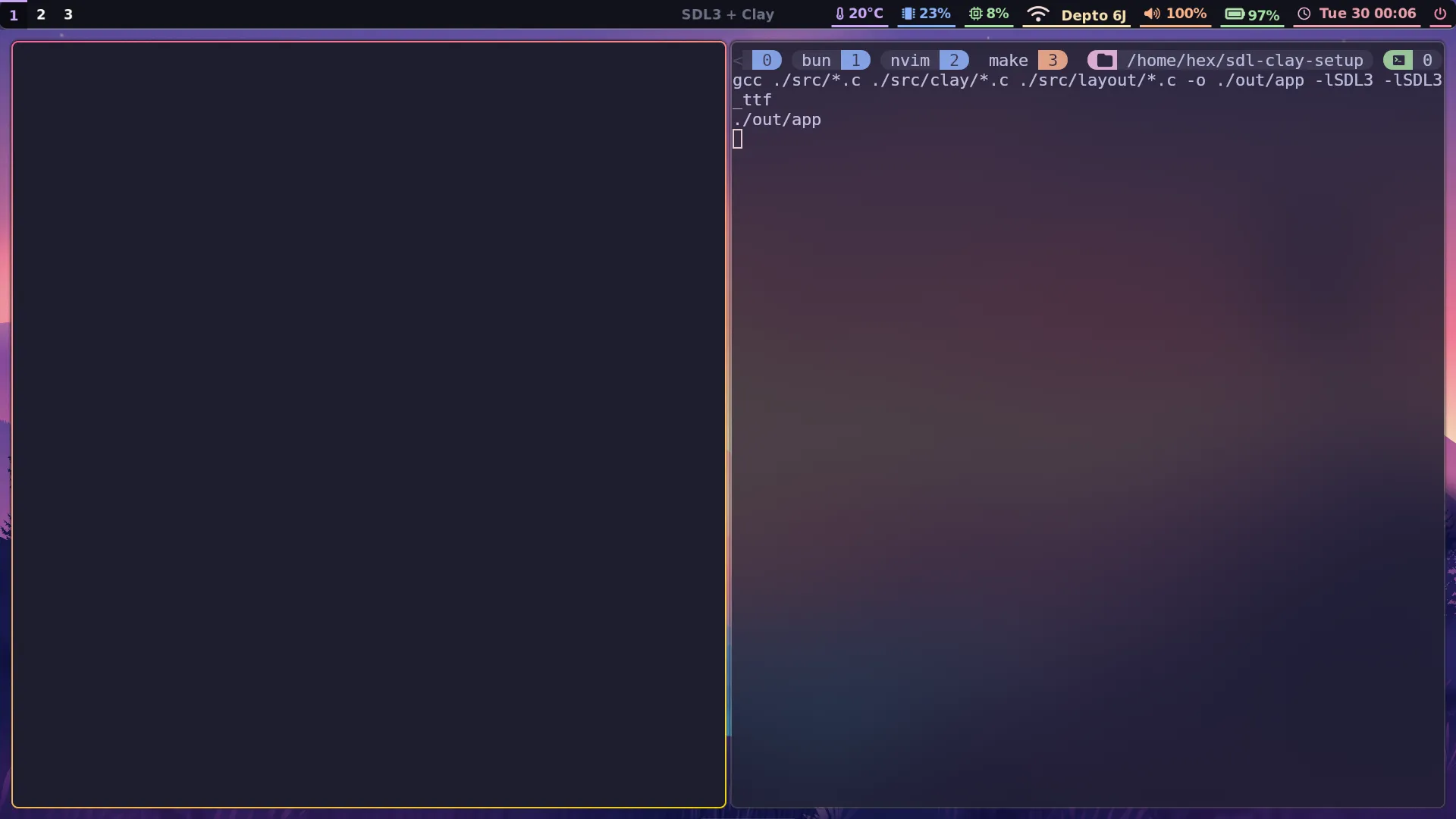
Woohoo! We’re getting somewhere.
Detecting window resizing
Although creating our first Clay element is a fantastic milestone, there’s a problem. If you resize the window, there’s just empty black space around it currently:
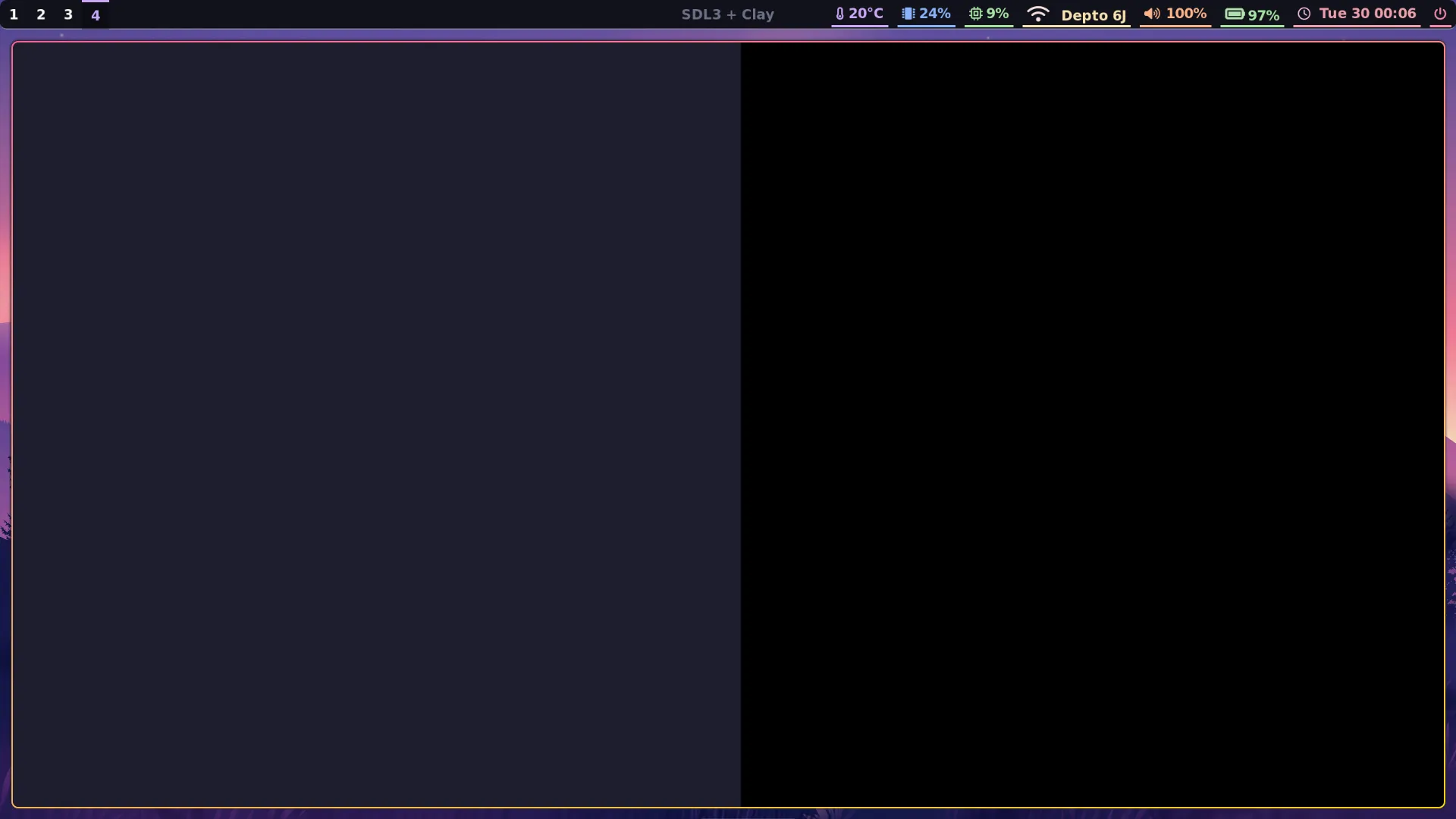
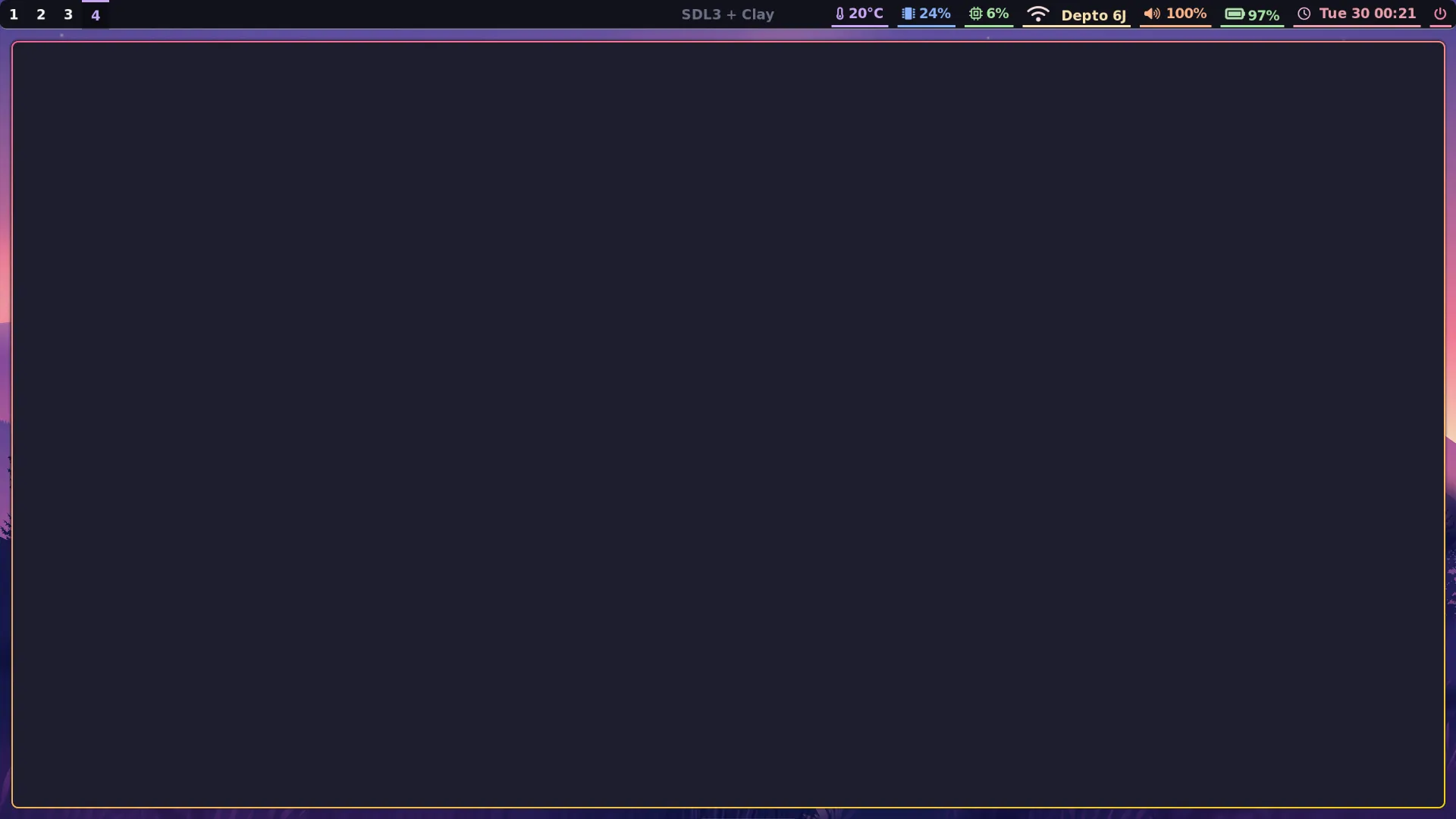
The problem is, Clay doesn’t know the window has been resized. This is something we need to set up handling for in event.c:
#include <SDL3/SDL.h>#include "state.h"
SDL_AppResult SDL_AppEvent(void *appstate, SDL_Event *event) {    AppState *state = (AppState*) appstate;
    if (event->type == SDL_EVENT_KEY_DOWN && event->key.scancode == SDL_SCANCODE_ESCAPE ||        event->type == SDL_EVENT_QUIT) {        return SDL_APP_SUCCESS;  /* end the program, reporting success to the OS. */    }
    if (event->type == SDL_EVENT_WINDOW_RESIZED) {        int width, height;        SDL_GetWindowSize(state->window, &width, &height);        Clay_SetLayoutDimensions((Clay_Dimensions) {(float) width, (float) height});    }
    return SDL_APP_CONTINUE;}
Simple!
Avoiding unnecessary redraws
All this time, I couldn’t help but notice my laptop’s fans were spinning up whenever I ran the app. Running top revealed it wasn’t just my imagination:
PID USER PR NI VIRT RES SHR S %CPU %MEM TIME+ COMMAND31341 hex 20 0 641748 86384 65788 R 94.8 0.6 0:23.04 app 1318 hex 20 0 1387864 158200 122788 R 33.8 1.0 19:32.82 Hyprland 2229 hex 20 0 381988 85448 8824 S 5.0 0.6 20:01.62 nvimCurrently we’re rerendering to the screen even if absolutely nothing has changed. This means SDL_AppIterate runs repeatedly at effectively whatever rate the CPU allows it to. To remedy this, we’re going to make a couple of changes so that:
- If nothing needs to be redrawn because the visual state of the app has not changed,
SDL_AppIteratecallsSDL_Delayfor 16 milliseconds and then returns immediately without rendering anything. - If an animation is currently in progress, we will cap the frame rate to 30fps.
Currently there is no animation system, but we’ll add this feature just so you can see what it would look like.
SDL_AppResult SDL_AppIterate(void *appstate) {    AppState *state = (AppState*) appstate;
    static const Uint64 FRAME_NS = 1000000000ULL / 60;    Uint64 now = SDL_GetTicksNS();
    /* Idle: nothing to do */    if (!state->needs_redraw && !state->animating) {        SDL_Delay(16);        return SDL_APP_CONTINUE;    }
    /* Animation FPS cap */    if (state->animating) {        if (state->last_frame_ns != 0) {            Uint64 elapsed = now - state->last_frame_ns;            if (elapsed < FRAME_NS) {                SDL_DelayNS(FRAME_NS - elapsed);                return SDL_APP_CONTINUE;            }        }    }    state->last_frame_ns = SDL_GetTicksNS();
    /* Draw to the screen */    SDL_SetRenderDrawColor(state->rendererData.renderer, 0, 0, 0, 255);    SDL_RenderClear(state->rendererData.renderer);    Clay_RenderCommandArray render_commands = create_app_layout(state);    SDL_Clay_RenderClayCommands(&state->rendererData, &render_commands);    SDL_RenderPresent(state->rendererData.renderer);
    /* Reset dirty flag */    state->needs_redraw = false;
    return SDL_APP_CONTINUE;}
The AppState struct now needs to be updated:
typedef struct AppState { SDL_Window *window; Clay_SDL3RendererData rendererData; bool needs_redraw; bool animating; Uint64 last_frame_ns;} AppState;We also need to make sure this flag is set whenever anything happens that requires a redraw. Currently the only event that does anything besides quit the app is resizing the window, so let’s tweak event.c:
    if (event->type == SDL_EVENT_WINDOW_RESIZED) {        state->needs_redraw = true;
        int width, height;        SDL_GetWindowSize(state->window, &width, &height);        Clay_SetLayoutDimensions((Clay_Dimensions) {(float) width, (float) height});    }
Lastly, we need to make sure needs_redraw is initialised to true so the app actually draws something when it initialises:
    int width, height;    SDL_GetWindowSize(state->window, &width, &height);    Clay_Initialize(clayMemory, (Clay_Dimensions) { (float) width, (float) height }, (Clay_ErrorHandler) { HandleClayErrors });    Clay_SetMeasureTextFunction(SDL_MeasureText, state->rendererData.fonts);
    state->needs_redraw = true;    state->animating = false;    state->last_frame_ns = 0;
    return SDL_APP_CONTINUE;
After a quick rebuild with make, running top shows this has fixed things:
PID USER PR NI VIRT RES SHR S %CPU %MEM TIME+ COMMAND 2229 hex 20 0 388544 92220 8828 S 7.3 0.6 25:13.84 nvim 1318 hex 20 0 1387384 158204 122792 S 3.3 1.0 21:29.89 Hyprland 9478 hex 20 0 488188 188672 15132 S 2.3 1.2 8:50.28 nvim 4847 hex 20 0 401848 104816 15008 S 1.3 0.7 14:42.74 nvim 2617 hex 20 0 656328 138640 87376 S 1.0 0.9 0:00.97 kitty 964 root 0 -20 0 0 0 D 0.7 0.0 0:01.02 kworker/u33:2+i915_flip 1797 hex 20 0 3518420 86120 70928 S 0.3 0.6 0:00.37 Web Content 1878 hex 20 0 3518420 86476 71304 S 0.3 0.6 0:00.36 Web Content 2521 hex 20 0 5648436 759788 321464 S 0.3 4.9 25:10.70 firefox 2606 hex 20 0 633172 86208 65608 S 0.3 0.6 0:00.12 appAdding some text
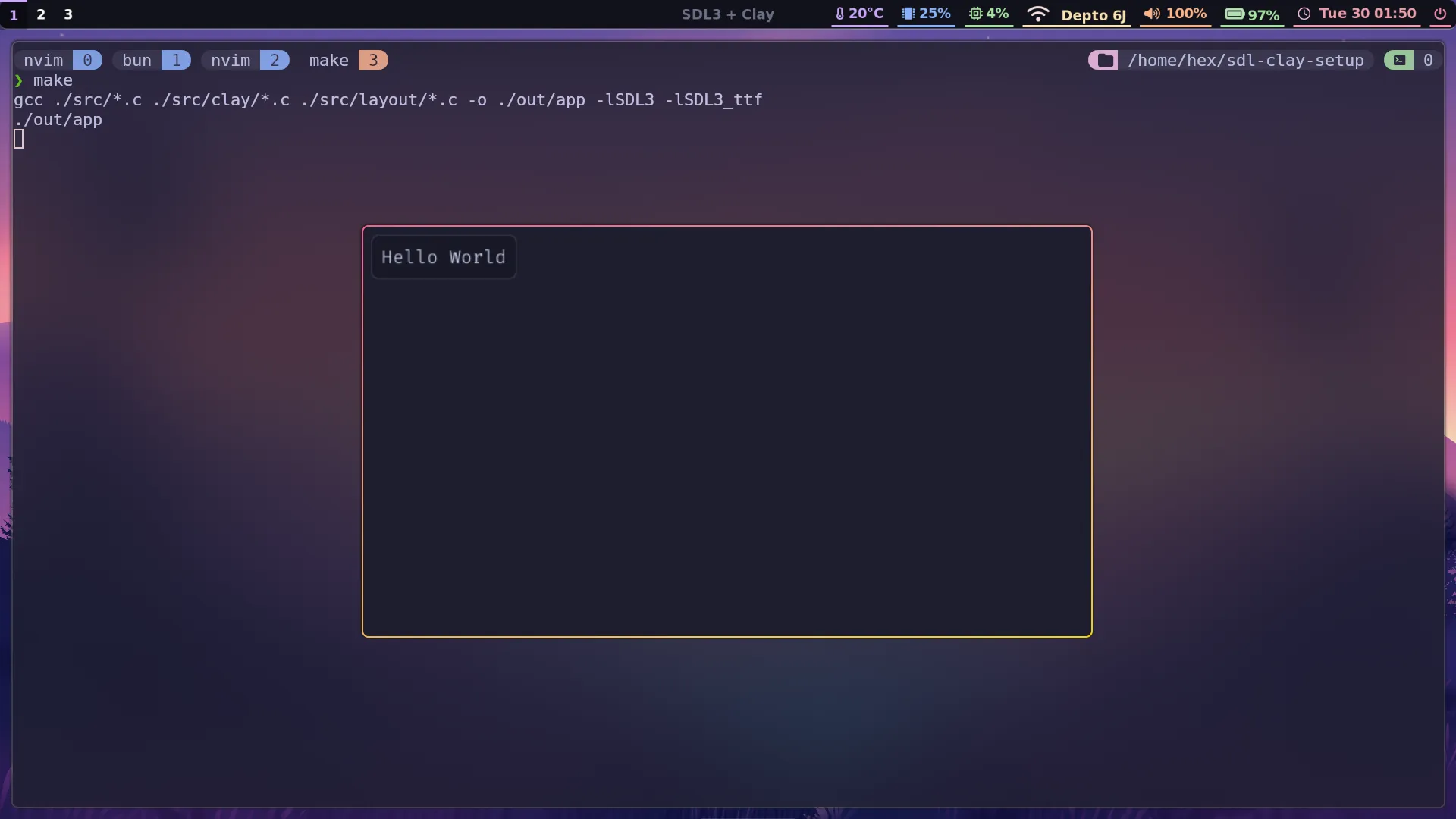
One last addition before we wrap up: let’s add an element with text.
#include "../state.h"
Clay_RenderCommandArray create_app_layout(AppState *state) {    Clay_BeginLayout();
    const Clay_Color backgroundColor = { 30, 30, 46, 255 };    const Clay_Color foregroundColor = { 24, 24, 37, 255 };    const Clay_Color accentColor = { 49, 50, 68, 255 };    const Clay_Color textColor = { 205, 214, 244, 255 };
    CLAY(CLAY_ID("Main Container"), {        .layout = {            .layoutDirection = CLAY_TOP_TO_BOTTOM,            .sizing = {                .width = CLAY_SIZING_GROW(0),                .height = CLAY_SIZING_GROW(0)            },            .padding = CLAY_PADDING_ALL(8)        },        .backgroundColor = backgroundColor    }) {        CLAY(CLAY_ID("Text Container"), {            .layout = {                .padding = CLAY_PADDING_ALL(8)            },            .backgroundColor = foregroundColor,            .border = {                .color = accentColor,                .width = CLAY_BORDER_ALL(1)            },            .cornerRadius = CLAY_CORNER_RADIUS(5)        }) {            CLAY_TEXT(CLAY_STRING("Hello World"), CLAY_TEXT_CONFIG({                .fontSize = 16,                .textColor = textColor,                .fontId = FONT_NORMAL            }));        }    }
    return Clay_EndLayout();
}
Once you start extracting Clay_ElementDeclaration structs and recurring property settings to variables in their own files, or writing your own macros, Clay starts to feel a lot like using a modern frontend JavaScript framework.
What’s next?
We might only have a grey rectangle to show for it, but we’ve accomplished a tonne in this post! In part 3, we’ll build some mildly nested and interactive layout, enable Clay’s built in debug console, and set up CMake to build both a desktop and WebAssembly version of our app.
You can view the state of the codebase you would have ended up with by following the past two posts here at any time.
← Back to blog